No products in the basket.
Why High-Endurance MicroSD Cards Matter: The Problem Cards Customers Send Back
24 November 2025

When choosing a dash cam, most people focus on video quality, night vision and clever features. One small part is often overlooked: the microSD card.
That tiny card is frequently the weakest link, and it can fail without warning even in the best dash cam money can buy. In our experience, most after-sales issues come straight back to using the wrong type of card. Choosing the right one is a low-cost step that makes your dash cam far more durable and reliable from day one.
What we see in after-sales
Our after-sales team regularly hears from customers reporting:
- Frequent recording errors
- The camera freezing or crashing
- Missing or corrupted video files
- The SD card not being recognised
- Memory Card Error messages popping up again and again
When we test the returned cards, the cause is almost always the same: the card wasn’t designed for continuous dash cam recording. Many of the problem cards are:
- Low-cost consumer-grade memory cards
- Cards intended for everyday photography
- Unbranded or counterfeit cards from unreliable sellers
- Cards with very low endurance ratings

Dash cams are demanding. A standard card is fine for storing photos on a camera, but a dash cam writes and overwrites high-resolution video, loop after loop, day after day. Cheaper cards simply can’t cope with that stress and fail early, leaving you without protection.
6 warning signs you’re using the wrong card
To see exactly how the wrong cards affect a VIOFO dash cam, our engineers ran dash cams on a sample of real cards returned to our after-sales department, and successfully reproduced the faults customers had reported. These are the typical issues linked to incompatible or low-quality cards.
1. Memory Card Error
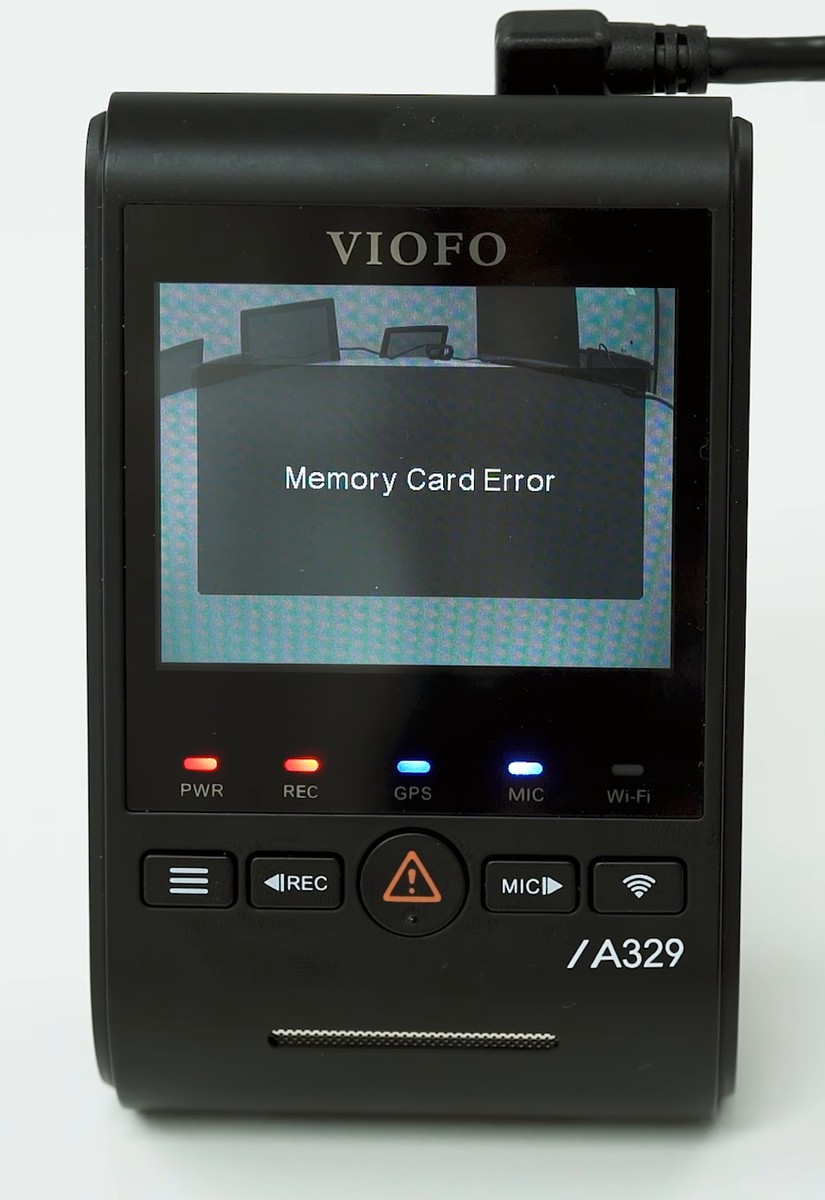
The dash cam shows this message because it can’t communicate properly with the card. It usually means the card is unstable, incompatible or has used up its write cycles.
See it happen: Memory Card Error (YouTube)
2. Card Slow

A card with a slow write speed struggles to keep up with high-bitrate recording, especially in 4K. That can mean dropped frames or recording stopping altogether.
See it happen: Card Slow warning (YouTube)
3. Memory Card Full, even after formatting
Cheap cards often develop file system errors that fool the dash cam into thinking the card is full when there’s space available.
See it happen: Memory Card Full after formatting (YouTube)
4. Slow start-up
A damaged or unstable card can hold up the boot process, so the dash cam takes several times longer than normal to start recording.
See it happen: Slow start-up (YouTube)
5. Frozen boot screen
A failing or incompatible card can stop the dash cam starting at all, leaving it stuck on the VIOFO logo screen.
See it happen: Frozen boot screen (YouTube)
6. Memory card formatting failed
Low-quality cards often can’t be formatted by the dash cam or a computer, which points to a hardware fault inside the card itself.
See it happen: Formatting failed (YouTube)
Don’t wait until it’s too late. These problems often start small and get worse until the card fails completely and the dash cam stops recording. If that happens during an incident, you’re left with no evidence for your insurer or the police.
Firmware updates: the first step in troubleshooting
VIOFO regularly releases firmware updates, not just to fix bugs and add features but also to improve compatibility with more microSD card brands and models. If your dash cam shows issues such as the Card Slow warning, we strongly recommend updating to the latest firmware first. A simple update often resolves compatibility issues and makes your existing card more stable.
The solution: the right high-endurance microSD card
Your dash cam is only as good as the card inside it. A robust card is the most cost-effective upgrade you can make for reliability, and it saves headaches later.
Our top recommendation: VIOFO industrial-grade microSD cards
If you own a VIOFO dash cam, we strongly recommend a VIOFO industrial-grade microSD card for the best performance and reliability. They’re engineered for the rigours of dash cam use, so your camera performs exactly as designed.
- Guaranteed compatibility: designed to work with all VIOFO dash cams.
- High endurance: built to withstand thousands of hours of continuous recording and overwriting.
- Reliable performance: engineered for stability across a wide temperature range.
- A choice of capacities: pick the size that suits your recording needs, from 64GB, 128GB and 256GB to 512GB.
Other trusted options, verified by customers
You may prefer another brand or already own a different card. While we recommend VIOFO cards for the best stability, there are alternatives. Based on extensive user feedback and our in-house testing, the SanDisk Max Endurance series is a solid choice for VIOFO dash cams.
Share your experience
We value the real-world experience of the VIOFO community. If you’re using a high-endurance card that isn’t on our list and it’s working well, let us know. Once the card is verified to work reliably in our dash cams, it can be added to the recommended list for other VIOFO owners.
Final thoughts
A dash cam is a smart investment in your safety, but it relies on one critical, often overlooked part: the microSD card. A weak card may seem fine at first, but it’s often the hidden cause of recording errors, missing footage and frustration just when you need it most.
Don’t risk your video evidence to save a few pounds. Choosing a robust, industrial-grade card from the start is the easiest way to protect your footage and extend the life of your dash cam. Switch to a VIOFO industrial-grade microSD card or a trusted alternative such as the SanDisk Max Endurance series.