No products in the basket.
Upgrade to the VIOFO HK6 Hardwire Kit: Smarter Parking Protection and Total Peace of Mind
30 October 2025

When it comes to protecting your car, your dash cam shouldn’t stop working just because the engine has. A hardwire kit lets the dash cam keep watch while you’re parked, giving you peace of mind when you’re away from the car, whether that’s at work, on the street outside home or in a supermarket car park.
Meet the VIOFO HK6 hardwire kit, a smart power solution that unlocks advanced parking monitoring to keep your vehicle protected around the clock.
Key features that make a difference
1. Modular, easy-to-install design
Removable input and output cables and simple plug-in connections make installation, maintenance and future upgrades easier than ever, with no rewiring needed.

2. Voltage display via Bluetooth
For the first time, the HK6 sends your car battery’s voltage to the dash cam over Bluetooth. You can keep an eye on battery health in real time, with the voltage embedded directly in the recorded video.

3. Seamless parking mode switching
Thanks to ACC detection, the HK6 automatically switches your dash cam into parking mode when you turn the engine off, and back to normal recording when you start up again. It’s completely hands-free.

4. Hybrid parking mode
Paired with an A329S series dash cam (A329S, A329T or A329WW), the HK6 intelligently switches between regular parking recording and Low Power Impact Detection based on both a set voltage level (Cut-off Voltage) and a time limit (Cut-off Time).

5. Smart battery protection
A side switch on the HK6 lets you choose from four voltage cut-off levels. If the battery drops below your chosen level, the HK6 shuts the dash cam off so there’s still enough charge to start the car next time.

6. Ultra-low power consumption
The HK6 itself draws very little power (≤300 µA) when the dash cam is off, so it puts virtually no strain on your battery. With the A329S series, Low Power Impact Detection keeps monitoring your vehicle on a minimal draw: only 0.24 W / 20 mA at 12 V in standby or sleep.

7. Works across a wide range of vehicles
The HK6 works with 12V to 24V systems, so it suits everything from cars and SUVs to vans, HGVs, buses and other heavy vehicles.

Things you might want to know
What’s the difference between the HK4 and the HK6?
If you’ve been using the HK4, the HK6 steps things up in a few meaningful ways:
- It syncs battery voltage with the dash cam over Bluetooth for real-time monitoring.
- Hybrid parking mode can switch based on actual battery voltage, not just a fixed timer, for smarter power management.
- Its detachable design makes installation and maintenance easier.
What’s the difference between Cut-off Voltage and Low Voltage Protection?
- Cut-off Voltage is set in the dash cam menu or app. In hybrid parking mode, it tells the dash cam when to switch from regular parking recording to energy-saving Low Power Impact Detection.
- Low Voltage Protection is set with the side switch on the HK6 box. It’s the final safety net, switching the dash cam off completely to protect the battery.
- Tip: set the Cut-off Voltage slightly higher than the Low Voltage Protection value, so the dash cam moves smoothly into Low Power Impact Detection rather than shutting off straight away.
Can I still use my Bluetooth remote with the HK6 connected?
Yes. The HK6 and the Bluetooth remote use different protocols, so they work happily together. You can’t connect a second HK6 or a second remote while one is already in use.
Do I need to pair the HK6 with my dash cam manually?
No. The dash cam automatically finds the HK6 over Bluetooth and remembers its unique MAC address. If you swap to a new HK6 later, reset the dash cam’s settings so it pairs with the new one.
How do I install the HK6?
Professional installation recommended: because this involves your vehicle’s electrics and there’s a risk of damage, we recommend having it fitted by a qualified installer.
Tools required
- Multimeter
- Needle-nose pliers
- Fuse puller
- Trim removal tool

Step 1: Find your fuse box
Fuse box locations and types vary between models, so check your vehicle’s owner’s handbook.

Step 2: Identify the battery and ACC fuses
Set your multimeter to DC voltage and test the fuse positions.
- Battery fuse: look for a fuse reading 12V or 24V.
- ACC fuse: look for a fuse reading 0V.

Step 3: Recheck the fuses
With the ignition on, recheck both positions. The battery (BATT) and ACC positions should now both read roughly 12V or 24V. If not, go back to step 2.

Step 4: Remove the selected fuses
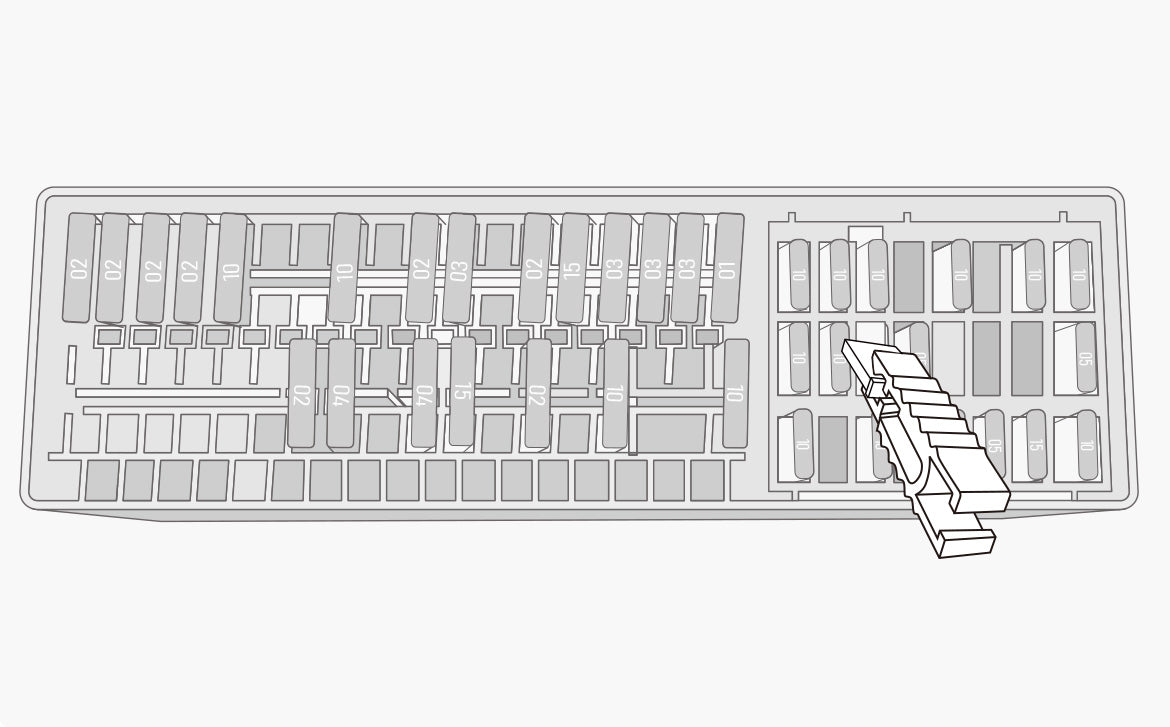
Use the fuse puller to remove the fuses from the battery and ACC positions. Keep them safe, as you’ll need them in the next step.
Step 5: Fit the fuses into the fuse taps
Check the type of the fuses you removed and make sure you have the matching fuse taps. Insert each fuse into its fuse tap.

Step 6: Connect the fuse tap
Insert the bare wire strands of the hardwire cable into the small metal tube on the fuse tap, then crimp it tightly with needle-nose pliers for a secure connection.

Step 7: Fit the fuse taps
Push the fuse taps back into the fuse box, making sure they’re properly seated. A stable connection is crucial for consistent power.

Step 8: Fit the earth wire (black)
Find a metal bolt near the fuse box to use as an earth point. Loosen it, slide the black earth wire’s terminal underneath, and tighten it securely.

Step 9: Connect the hardwire cable
Run the Type-C plug up to the dash cam and plug it into the power port on top of the GPS mount.

Step 10: Test the dash cam
Start the car to power up the dash cam. Once it has booted, enable Parking Mode in the settings menu. The parking mode icon should appear on the left of the screen, confirming the installation worked.

Step 11: Hide the wiring
Use the supplied trim tool to tuck the cable neatly behind the trim, following a recommended route for a clean, professional finish.

Final thoughts
The HK6 isn’t just a power cable; it’s a proper upgrade for your vehicle’s security, keeping it protected while it’s parked.
Ready to upgrade? Get the VIOFO HK6 hardwire kit from our UK store.